
By clicking "Accept", you agree to the storing of cookies on your device to enhance site navigation, analyse site usage, and assist in our marketing efforts. View our Cookie Policy for more info.
One entry. Many insurers.
Compare quotes from aggregators and direct insurer panels side by side. Premium funding quotes from leading ANZ funders, requested without leaving the platform. All without re-keying.
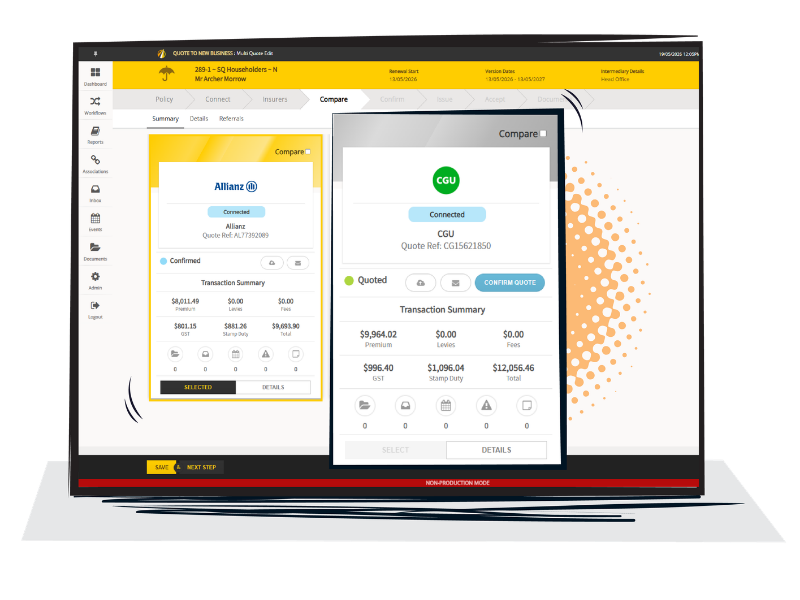
Enter risk information into JAVLN Platform and get quotes back in a single comparison view. Faster to the right cover. Higher conversion. More time advising clients.
Premium funding options follow automatically. Quote becomes policy in the same workflow.


Consolidated comparison view. See premiums, fees and totals for every insurer side by side, with a client-ready comparison report.

Aggregator platforms and direct insurer connections. JAVLN Platform supports leading quote aggregators alongside direct API and emailed quote workflows for the insurers your brokerage relies on most.

Premium funding integrated. JAVLN Platform integrates with leading ANZ premium funders to generate funding quotes. Request funding quotes right inside JAVLN and stay in one workflow from request to loan. Brokers offer financing alongside the policy without leaving the workflow.

Quote-to-bind in the same workflow. Once you've selected the right cover, binding happens in the same screen. One screen. One workflow. No re-key. The bound policy automatically generates client documents and schedules. Compliance documents like FSGs are tracked with a full, timestamped issuance record.
Multi-quote is purpose-built for Australia and New Zealand insurance brokers, with specifically tailored insurer connections, workflows and compliance checks. ASIC, IBCOP and APRA requirements are recognised inside the workflow, built into how your team works.
For brokers moving from older broker management systems, the difference shows up in the first quote: One portal. One entry. One conversation that finishes today.

Single-entry risk capture. Enter the client and risk details once. The same information populates every quote request you send out, whether to a connected aggregator or a direct insurer panel.

Faster quote turnaround. Sending quotes to clients quicker means brokers spend less time on data entry and more time advising clients.

Higher conversion. When a client sees options side by side, including premium funding, you're advising on cover with options on the table from the first conversation.

More time for advisory work. Re-keying is the single biggest tax on broker productivity. Removing it gives your team back the hours that grow GWP.

Quoting software lets brokers enter a client's risk details once, request quotes from multiple insurers and compare them side by side. In JAVLN Platform, multi-quote brings aggregator and direct insurer quotes into one comparison view, adds premium funding quotes from ANZ funders and lets you bind the chosen cover in the same workflow.
JAVLN Platform supports multi-quote comparison via our integration partners, plus direct connections to a wide range of insurer panels used by Australian and New Zealand brokers. The exact insurer set depends on your brokerage’s network and panel arrangements - we confirm coverage with you during onboarding.
Request premium funding quotes without leaving the platform. Results appear automatically as funders respond, giving your team time back for clients. JAVLN Platform integrates directly with leading Australian and New Zealand premium funders, so funding quotes appear inline alongside the insurer quote.
No. Risk details are captured once and used across every quote request, whether from a marketplace or a direct insurer connection: one entry, with quotes from across your connected panels.
Yes. Once you’ve selected the right cover, binding, document generation, and (with JAVLN Officetech) the compliance documentation all happen in the same flow. The bound policy is immediately visible to the rest of your team in the client record.